In standard HTML parsing, some web browsers may be more tolerant than
others when it comes to errors such as missing </p>
or </li> tags. This can lead to differences in the
internal DOM tree and sometimes subtle differences in behaviour and
the way CSS is applied, which can be hard to debug.
Hence, it is good practice to write clean HTML and to validate it, so as to catch unintended mistakes (analogous to linting source code). David Sveningsson gave a good talk at FOSDEM 2021 explaining this.
The best approach is to validate as you go. Enter some content, and then check that your HTML file is still valid.
A single error in your HTML source code (such as a missing closing paragraph tag) can sometimes produce a cascade of follow-up error messages. Leaving validation until the end often results in an overwhelming number of error messages. If this is the case, just start at the top and fix them one by one. Fixing one will often eliminate several follow-up error messages at the same time.
For the HCI practicals, we will check your HTML reports with html-validate.
html-validate is a HTML validation tool written in TypeScript for
Node.js. More information can be found
at
html-validate.org. The source code is available
on GitHub.
Make sure Node.js is installed on your platform (v24.14.0 LTS), following the
instructions
on nodejs.org.
Verify that Node is installed by running the command:
node -v
Install html-validate with the command:
npm install -g html-validateThis will install the command
html-validate globally, so
it can be run in any directory.
A config file called hci-validate.json is provided
with the materials. It contains the following:
{
  "root": true,
  "extends": ["html-validate:document", "html-validate:recommended"],
  "rules": {
    "require-sri": "off",
    "no-trailing-whitespace": "off",
    "void-style": ["error", { "style": "selfclosing" }],
    "no-raw-characters": "error",
    "wcag/h63": "off"
  }
}
Make sure it is in the same directory as the HTML file to be validated. Do not change the contents of the config file!
Validation of an HTML file is performed by issuing the command:
html-validate --config hci-validate.json he.html
in this case to validate the file he.html
(assuming the config file is located in the same directory
as the HTML file).
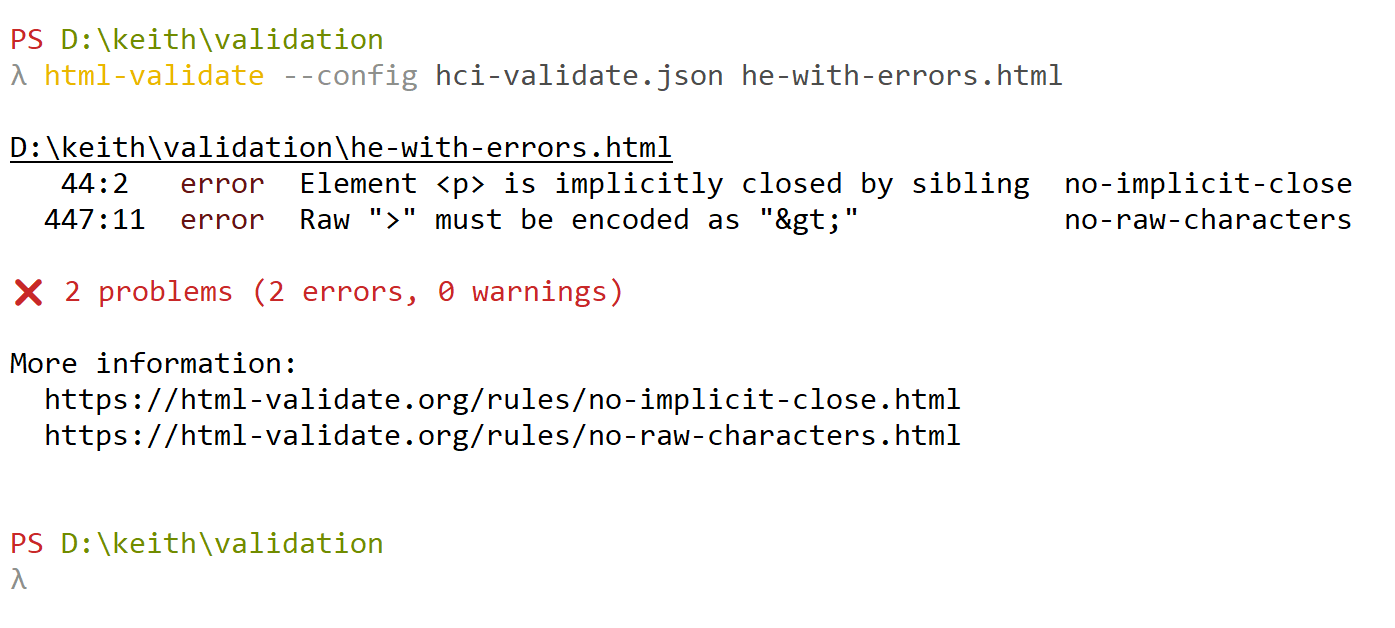
If no errors are found, nothing is output. If errors are found, the output will look something like Figure 1.